Track your first habit
Habit tracking in Dayprints supports the day without blocking your plan from completing.
Choose a habit you can recognise
Use a specific action rather than an identity or broad outcome:
- “Walk for 10 minutes” instead of “Get healthy”.
- “Read five pages” instead of “Read more”.
- “Prepare tomorrow’s bag” instead of “Be organised”.
Choose the smallest version that still counts. The habit should tell you when you have done enough.
Create the habit
Habits live in their own Habits section on Today, above Saved routines. Use the arrow beside Habits to open habit management, then add a name. Choose target days if it is not daily. Free includes three active habits, but starting with one keeps the signal clear.
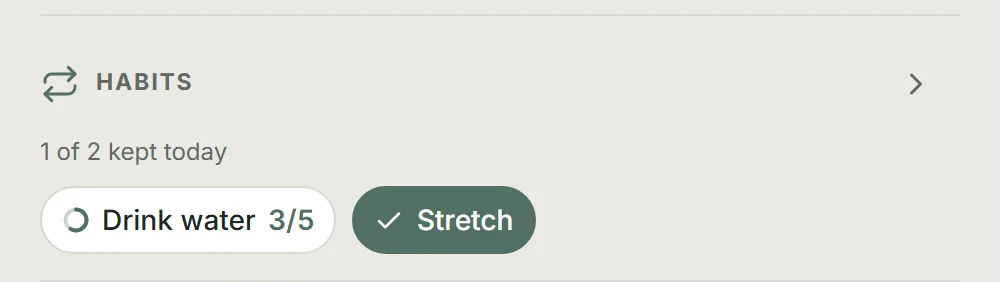
New accounts start with two to look at: Drink water and Stretch — one counted, one simple. Edit them, change their targets, or archive either one and add your own.
Habits that happen more than once a day
Some habits are not a single moment — drinking water, or stretching between stretches of work. Set Times per day when you create or edit the habit. Most habits stay at once a day, which is the default.
Edit or archive a habit
Use the arrow beside Habits on Today, then tap the pencil beside the habit you want to change. The Habits page opens the editor above the active-habit list. You can change the habit's name, times per day, and target days. Tap Save habit when you are done, or use the X at the top to close the editor.
Archive habit stops future check-ins and removes the habit from Today and the active habit list. It does not delete the habit or its recorded check-ins. It stays in Progress under Habit consistency for as long as it has check-ins inside the seven days that view covers, so an archived habit you were part-way through still shows the days it earned. Once those check-ins fall outside the window it drops off the list rather than sitting there at zero.
To bring one back, choose Review archived habits at the foot of habit management, then select Restore. The habit returns to Habits with its schedule unchanged and needs room in your active-habit limit.
Mark it when it happens
Tap the habit pill on Today after completing the action. Reaching its daily target adds Momentum; completed and partly-done counts appear in Progress. Habits do not light task progress beads or prevent a qualifying completed plan from creating a Dayprint.
For a habit set to more than once a day, the pill shows its target before you begin — such as 8x. Each tap adds one and changes the count to progress such as 3/8. Reaching the number completes the habit for that day. Tapping once more resets the day's count if you need to correct it.
A partly-done count still counts as showing up: it keeps your rhythm, exactly as one completed task or any other habit would. It is not reported back to you as a shortfall anywhere, on any screen.
Treat missed days as information
If you keep missing it, reduce the action, change the target days, or use a more reliable cue. Rhythm can pause and restart. Rest days do not reduce Momentum, and your tier never moves backwards.
Put this into practice with Dayprints. Plan what matters today and collect a dated artwork for each day you finish.
Works in your browser. Add it to your phone's home screen whenever you like and use it like an app.