In-depth guide
How to Prioritise Tasks When Everything Feels Urgent
Prioritise tasks by checking capacity, consequences and real deadlines. Choose what fits, decide what waits, and reset when the day changes.
Download the free PDFNo sign-up needed. Same guide, formatted for reading offline or printing.
The short answer: To prioritise tasks, first work out how much time and attention today actually holds. Then compare tasks by what happens if they wait: real deadlines, the people or work they unblock, and the outcomes they move forward. Choose the few that fit, define a first step for each, and write down what will wait. When something new arrives, decide what it replaces. If the commitments cannot all fit, change the scope, the deadline or who does the work, with the people involved.
Most advice on prioritising starts with a list and a way of ranking it. Rank by urgency and importance. Number everything A to E. Pick your six most important tasks. These methods help, but they share a blind spot: they treat prioritising as putting tasks in order, when the hard part is deciding what today can hold and being honest about what it cannot.
That is why prioritising so often fails by mid-morning. The ranked list is fine; the day simply had room for three of its twelve items, and the other nine were never really going to happen. Meanwhile an urgent-looking email arrived and quietly took the place of the most important task.
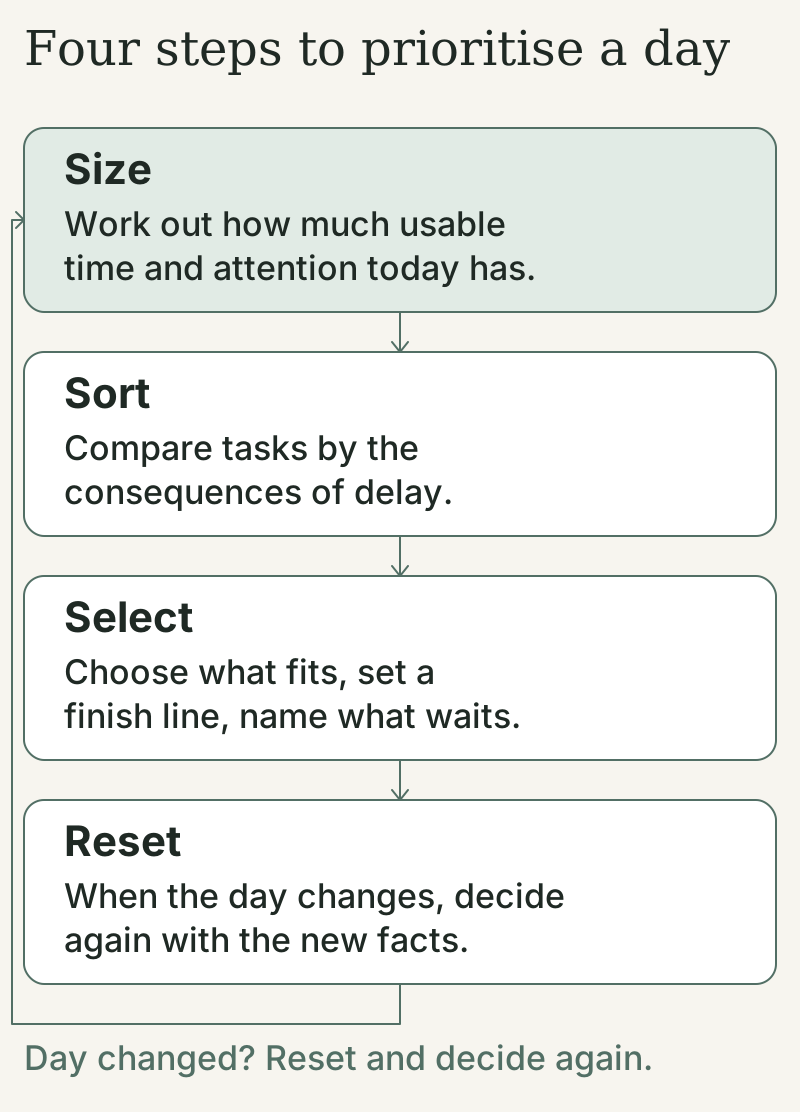
This guide treats prioritising as a daily trade-off. Every choice to do something today is also a choice about what waits, and the skill is making that choice deliberately rather than by default. The method has four steps:
- Size. Work out how much usable time and attention today actually has.
- Sort. Compare tasks by the consequences of delay, not by how loudly they ask.
- Select. Choose what fits, give each priority a finish line, and name what waits.
- Reset. When the day changes, decide again using the new facts.
The steps work on paper, in a notes app or in any task manager. They also work when someone else controls much of your workload, which has its own chapter.
The method, the scripts and the worksheets are practical tools informed by the research cited throughout. They have not themselves been tested as a programme. Where a claim rests on a study, the study is named and listed in the sources and research notes.
Where to begin. If you have too much to do right now, go straight to prioritising in ten minutes. If someone keeps adding to your list, go to when everything is urgent. If your plan has already fallen apart today, go to resetting priorities when the day changes.
How to prioritise tasks in ten minutes
If you are looking at too many tasks right now, do this first. It takes about ten minutes and produces a decision you can act on. The timing is a suggestion; its job is to stop the deliberating and get you working on the right thing.
Minutes 0 to 2. Check what is on fire. Scan for anything with a consequence today: a deadline in the next few hours, someone blocked waiting for you, a commitment you made for today. Note them. If several commitments have consequences today, note the conflict before choosing.
Minutes 2 to 4. Count your usable time. Look at your calendar. Subtract meetings, travel, breaks and the time messages will take anyway. What is left is your real working time today, and it is usually less than you think.
Minutes 4 to 7. Choose what fits. Pick the one task that would make today a success if it were the only thing you finished. Then add one or two more only if they still fit in the time you counted. For each, write a finish line: what "done for today" means.
Minutes 7 to 9. Write down what waits. List the tasks you are deliberately not doing today, with a day or a next step beside the ones that need one. This is the step most often skipped. A date or next step gives deferred work somewhere to return to, so it competes less with what you chose.
Minutes 9 to 10. Start. Begin the first task now, or at the first gap in your calendar. If starting is the difficulty, the guide to stopping procrastination has a five-minute way in.
The Daily Decision Sheet
Use this on paper, in a note, or in the free PDF version of this guide.
- Usable time today (after meetings, breaks and messages):
- Anything with a consequence today:
- Candidate tasks, with a rough estimate for each:
- My defining task (if I finish only this, today worked):
- Its finish line for today:
- Supporting tasks that still fit:
- When each selected task fits (which window):
- My first action:
- What waits, and until when:
- If something new arrives, the first thing I would move:
The last line is a decision made in advance. When the interruption comes, and one usually does, you will already know what gives way.
A worked example
Dev, a project coordinator, opens his laptop on a Wednesday to eight candidate tasks, three meetings and a lunch break. Here is how the morning decision goes. The same example runs through the guide, including what happens when his afternoon changes.
His tasks: revise the client budget (the client approves it at 10am tomorrow); reply to a supplier's quote, which holds its price until Friday; prepare slides for next Thursday's quarterly review; review a draft by his colleague Mina, which she cannot finish without his comments and which is due tomorrow afternoon; update the weekly project tracker, which the team reads on Friday; register for a vendor webinar ("only 50 places left"); learn the new reporting tool his manager recommended; and clear his inbox.
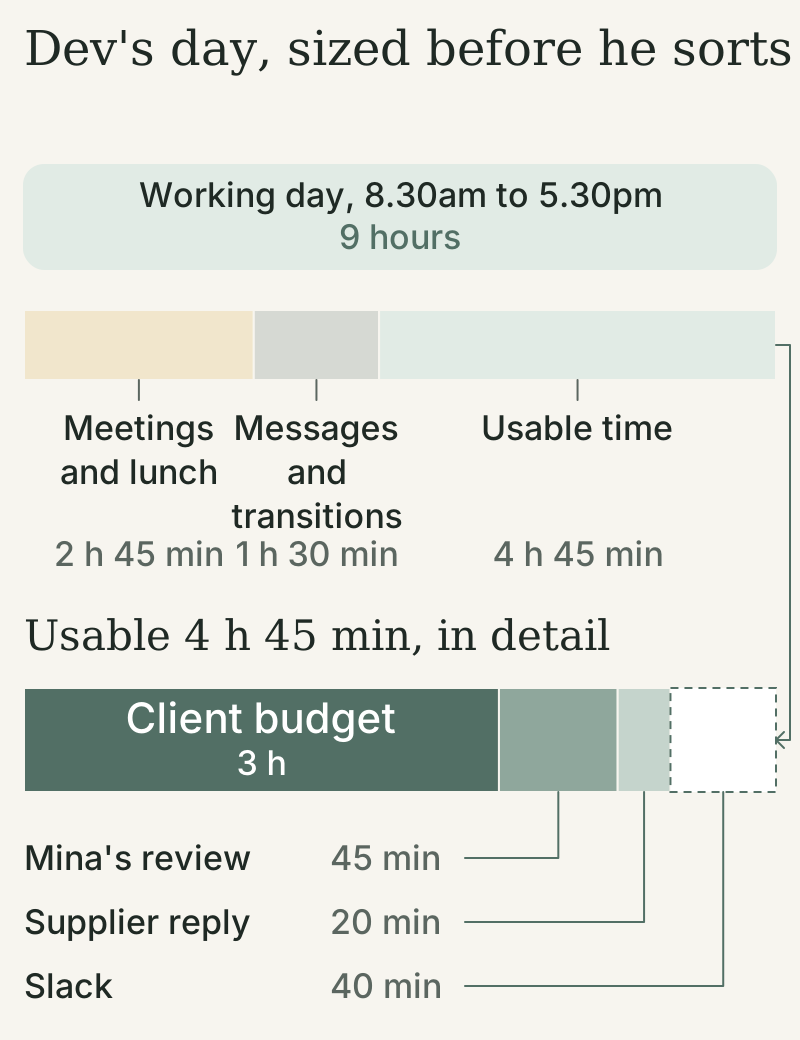
His calendar holds a stand-up, a client call and a one-to-one, plus lunch. Once those and the usual messages are taken out, he has about four and three-quarter hours of usable time, spread across the gaps between meetings.
His defining task is obvious once he asks what happens if it waits: the budget revision must be ready for tomorrow's meeting. He estimates two and a half to three hours including checking. Mina's review (about 45 minutes) is next, because she is blocked without it. The supplier reply takes 20 minutes and protects a price. He reserves three hours for the budget, 45 minutes for the review and 20 minutes for the supplier: four hours and five minutes, leaving 40 minutes of slack.
What waits: the quarterly review slides (Thursday morning, starting with an outline of the slide headings), the tracker (Friday), the reporting tool (30 minutes on Friday afternoon), and the inbox (two short passes rather than a clear-out). The webinar does not make the list: registering would take two minutes, but the session itself is of little use to him. The later chapters explain each of those calls.
Dev is an illustration, not a real person, but the decisions are the ones the rest of this guide is built around.
Why prioritising tasks feels difficult
If prioritising feels harder than it should, that is not a personal failing. Several well-documented tendencies push in the wrong direction, and most workplaces add more.
Urgency is louder than importance. In a series of five experiments, people chose to do tasks with lower payoffs over tasks with better payoffs when the lower-value tasks merely looked urgent, for example because they seemed about to expire. This happened even when the usual good reasons for doing urgent tasks first had been removed (Zhu, Yang and Hsee, 2018). The researchers called it the mere urgency effect: urgency seems to carry its own pull, separate from what the task is worth. The experiments used small laboratory tasks, but the pattern will be familiar to anyone whose morning has been taken over by "quick" requests with an urgent subject line.
Time is shorter than it looks. People consistently underestimate how long their own tasks will take, a bias that does not apply in the same way to their predictions about other people. In a set of studies, people predicting their completion times focused on plans for the future and overlooked their own past experience of similar tasks, and so their estimates were too optimistic (Buehler, Griffin and Ross, 1994). This is called the planning fallacy, and it is why a plan built on hopeful estimates fails before lunch.
A long list hides the trade-offs. When every task sits in one long list, nothing tells you that adding a task means something else will not happen. Each item looks like a small promise, and the total looks manageable until the end of the day reveals otherwise. Why long to-do lists make you less productive explains this in more detail; the fix is not a shorter master list but a separate, much shorter decision about today.
Your obligations compete. Work, family, health and other people's requests all have legitimate claims. Prioritising is not about finding the one right task in a vacuum; several worthwhile commitments may compete for the same hour.
Time management is associated with wellbeing as well as performance. A meta-analysis of time management research found that time management was moderately associated with job performance and academic achievement, and somewhat more strongly with wellbeing, including life satisfaction, and with lower distress (Aeon, Faber and Panaccio, 2021). An earlier review of 32 studies found time management behaviours related to a greater sense of control over time, more job satisfaction, better health and less stress, while the link with performance was less clear (Claessens and colleagues, 2007). Both reviews are mostly based on correlational research, so they cannot show that better prioritising causes these benefits. But they suggest the value of deciding well is felt as much in calm and control as in what gets done.
Sometimes the problem is not prioritising at all. If, day after day, the commitments you are given cannot fit in the time you have, no amount of sorting will fix it. That is a workload or resourcing problem, and the honest response is to make it visible to whoever can change it. The chapter on when everything is urgent covers how.
Size: work out what today can hold
Before you compare tasks, find out how much room there is. A ranking without a size limit is only a wish list.
Start with the fixed shape of the day. Mark meetings, appointments, travel, school runs, meals and anything else that will happen whatever you decide. Add a little time either side of meetings for getting there, getting set up and catching up afterwards. These transitions are real, and leaving them out is one of the commonest ways a day overfills.
Find your usable windows. What remains is not all equally useful. A 20-minute gap between meetings is good for a reply or a review, not for work that needs an hour of concentration. Note your longer windows separately; they are where your most demanding priority needs to go.
Subtract the work that will happen anyway. Messages, questions from colleagues, small admin and the occasional interruption take time every day. If they took about an hour yesterday, assume about an hour today. You can guard against them, but a plan that assumes they will not happen at all will not survive.
Estimate tasks from experience, not hope. Optimistic estimates come partly from imagining how a task should go rather than remembering how similar tasks went. In one study, the optimistic bias disappeared when people were asked to connect their prediction to their relevant past experiences before estimating (Buehler, Griffin and Ross, 1994). So before you estimate, ask: last time I did something like this, how long did it actually take?
Break big tasks into steps before estimating. In experiments on what researchers call unpacking, people who listed the components of a multi-step task before estimating gave longer, more realistic estimates than people who estimated the task as a whole, and the benefit was greater for more complex tasks (Kruger and Evans, 2004). "Prepare the report" hides gathering numbers, drafting, checking and formatting. Listing them takes a minute and corrects much of the optimism.
Include setup and checking. Include finding the file, recovering the context, checking the result and sending it. A two-hour drafting task is often a three-hour task once these are counted.
Leave slack. Something unplanned happens most days. Rather than a fixed percentage, compare planned task time with your actual usable time over several recent days, then leave room for the interruptions or overruns you repeatedly encounter. The guide to estimating task time covers ranges, reference classes and buffers in more depth.
What this looks like for Dev
Dev's working day runs from 8.30am to 5.30pm. His meetings and lunch take two and three-quarter hours, leaving about six and a quarter. Messages and transitions usually take about an hour and a half, so he has around four and three-quarter hours of usable time. Thinking back to the last budget revision, which took nearly three hours once he included checking the figures, he estimates two and a half to three hours rather than the 90 minutes he first wrote, and reserves three. The budget is his longest task, so it gets an hour and a quarter before lunch and his longest window, from 1.45pm to 3.30pm.
If your days are packed with meetings, planning a busy day shows how to build the plan around the calendar, and daily capacity planning gives the full capacity procedure.
Sort: decide which tasks matter most today
With the size of the day known, you can compare tasks properly. The aim is not a perfect ranking of everything; it is to identify the few tasks that deserve today's limited room.
The word "important" is too vague to be useful on its own, so turn it into questions. Ask these of each candidate task, roughly in this order:
- What happens if this waits until tomorrow? Until next week? Some tasks lose little by waiting; others cost money, damage trust or cause a problem that grows. The consequence of delay is the single most useful test.
- Is the deadline real, and whose is it? A deadline set by a client's board meeting is different from a date added to an email as a placeholder. Ask whether the date is tied to an external event or can be negotiated. Some deadlines are firm; many can move once you ask.
- Is anyone waiting on this? A task that unblocks a colleague, a client or a later step of your own work often matters more than its size suggests, because delay multiplies across the people waiting.
- Does it move something important forward? Some tasks contribute to an outcome you or your organisation care about: a project milestone, a goal, a relationship. Others keep things ticking over. Both are necessary, but the first kind is the one most easily squeezed out.
- Is it ready? A task that depends on information you do not have yet, or a decision someone else has not made, cannot be your priority today. Its priority may be the step that unblocks it: send the question, book the call.
- Does it fit the time and energy available? A demanding task belongs in a long window when you can think clearly. A small one can fill a gap. This is a tie-breaker, not the main rule.
Urgent is not the same as important
Urgency is about timing: how soon something needs attention. Importance is about consequences and value: what difference it makes. A task can be both, either or neither.
The distinction is usually attributed to President Dwight Eisenhower, who said in a 1954 speech: "I have two kinds of problems, the urgent and the important. The urgent are not important, and the important are never urgent." He was quoting someone else, whom he described only as a former college president. The four-box matrix named after him, with urgent and important as its two axes, was popularised decades later, notably by Stephen Covey in The 7 Habits of Highly Effective People (1989).
The matrix is a useful prompt. It has two limits worth knowing. It does not account for how long tasks take or how much time you have, so a matrix can put six tasks in the "urgent and important" box on a day with room for two. And the research cited here does not establish the matrix's effectiveness as a complete method; treat it as a way of thinking rather than a proven technique. Use it to spot what you are neglecting, then use your capacity to decide what actually fits.
The mere urgency effect suggests an extra check: when a task feels urgent, ask whether the urgency is real. An expiring offer or an urgent subject line can attract attention without establishing that the task deserves priority. The question is what you lose if you ignore it.
Sorting Dev's list
| Task | If it waits? | Deadline real? | Who is waiting? | Moves something forward? | Estimate |
|---|---|---|---|---|---|
| Revise client budget | Client meeting goes ahead without it | Yes: 10am tomorrow | The client | Yes: the project's approval | 2.5–3 hours |
| Review Mina's draft | She stays blocked | Her draft is due tomorrow afternoon | Mina | Yes: her deliverable | 45 minutes |
| Reply to supplier quote | Price may rise after Friday | Yes: Friday | The supplier | Slightly | 20 minutes |
| Quarterly review slides | Little today; tight if left past Monday | Yes: next Thursday | No one yet | Yes | 3 hours |
| Update project tracker | Nothing until Friday | Yes: Friday | The team, on Friday | Yes: keeps the team's Friday information current | 30 minutes |
| Learn reporting tool | Nothing visible | None | No one | Yes, over months | Ongoing |
| Register for vendor webinar | Lose a place | Says "50 places left" | No one | No | 2 minutes to register; 1 hour to attend |
| Clear inbox | Messages wait | None | Varies | Rarely | Open-ended |
Every task on the list is ready to start, so the readiness question changes nothing today. The table makes three things clear. The budget is the defining task. Mina's review and the supplier reply are small, consequential and ready. And two tasks with the loudest signals (the webinar and the inbox) have the least behind them.
For a deeper treatment of deadline-versus-importance cases, see due first or important first. If you only need a quick way to choose your very next task, how to decide what to work on today gives a five-question sequence.
Select: choose priorities that fit and name what waits
Sorting tells you what matters. Selecting turns that into commitments for today, and decides what will not happen.
Choose one defining task. Ask: if I finish only one thing today, which would make the day a success? That task gets your best window and comes first in the plan. Having one defining task keeps a hectic day from becoming a list of small completions with the important thing still untouched. In a study of the daily diaries of knowledge workers, making progress in meaningful work was the most common feature of the days people rated as their best (Amabile and Kramer, 2011). Even a small step on meaningful work is worth noticing.
Add supporting tasks only if they fit. After the defining task, add one or two more that matter and still fit your usable time. Many people find three priorities a practical limit; it is a convention, not a research finding. The real limit is the time you sized earlier. On a day full of meetings, one priority may be all that fits, and that is a sound plan, not a failure.
Give each priority a finish line. "Work on the budget" can expand all day. "Revise the budget, check the totals and send it to the client" tells you when you are done. If a task is too big to finish today, define today's part: "Draft the first three sections", not "Write the report".
Write down what waits. List every task you considered and chose not to do today, with a day or a first step beside each one that needs it. This list does two jobs. It makes the trade-off visible, so you know exactly what you are choosing not to do. And it gives those tasks a home, so they stop competing for attention while you work on your priorities.
Fill gaps with small work, deliberately. Short gaps between meetings are good for small, ready tasks: a reply, a quick review, a form. Choose these in advance so gaps do not fill with whatever is loudest.
The Today list guide shows how to structure a bounded daily list around these choices, and choosing your Top 3 tasks gives detailed examples of a defining task and its supporting priorities. If you are unsure how much to put on a day, how many tasks should be on your Today list compares different kinds of day.
If you plan in Dayprints, Up next suggests a single task to start with and always says which rule chose it: an overdue or due-today task, higher priority, whatever is scheduled soonest, or the quickest win. You can choose a different task as Up next yourself, and that choice stays first and leads Your Top 3. The app orders by dates and priority; it cannot weigh consequences for you, which is why your own choice outranks its rules.
Popular prioritisation methods, and what each is for
Most named methods are useful for one part of the job. The cited research does not establish which of these complete methods works best, and none replaces checking what fits in the day.
| Method | What it does | Good for | What it misses |
|---|---|---|---|
| Eisenhower matrix | Sorts tasks by urgent and important | Spotting important work you keep neglecting | How long tasks take and how much time you have |
| ABCDE | Labels tasks A (serious consequences) to E (eliminate) | A quick consequence-based sort of a long list | Capacity; several A tasks can still overfill a day |
| Ivy Lee method | Write up to six tasks for tomorrow, in order; work down the list | Ending the day with a decision made | Whether six fit; it is a historical practice, not a study |
| Top 3 or most important tasks | Choose one to three priorities for the day | Focus on a bounded set | What to do with everything else, unless you also list what waits |
| Eat the frog | Do the hardest or most dreaded task first | Days when avoidance is the main problem | Whether the hardest task is the most important one |
| Time blocking | Give tasks specific slots in the calendar | Protecting priorities from meetings and messages | Which tasks deserve the blocks |
| MoSCoW | Must, should, could, won't | Agreeing scope with other people | Sequencing within the day |
The method in this guide borrows from several of these: consequence sorting from ABCDE and the matrix, a small set from Top 3, and protected time from time blocking. The part most methods leave out is the first step, sizing the day, and the last, resetting when it changes.
How to protect your priorities while you work
Choosing priorities is half the job. The other half is keeping them from being displaced by everything else that happens in a working day.
Put the defining task in your best window. Use your longest uninterrupted stretch at a time of day when you think clearly. For many people that is earlier in the day, but not for everyone; use your own experience. If your best window is not until the afternoon, protect it in the calendar.
Group small tasks. Replies, approvals and quick admin are easier to do together in one or two batches than scattered through the day. Batching also keeps them out of the windows you need for demanding work.
Reduce avoidable switching. Switching tasks can take extra time. In laboratory experiments, switching between tasks took longer than repeating the same task, and the cost grew as the tasks became more complex (Rubinstein, Meyer and Evans, 2001). This supports reducing avoidable switching, though it does not tell us how much time switching costs in an ordinary working day.
Finish to a clean stopping point, or leave a note. In two experiments, people who switched away from an unfinished task kept part of their attention on it, and their performance on the next task suffered. Simply finishing the first task was not always enough; finishing it under time pressure helped people let go and move on (Leroy, 2009). The researcher called the leftover attention "attention residue". When you have to stop mid-task, write down the exact next step. Separate experiments found that making a specific plan for an unfinished goal removed its intrusive effects, such as distracting thoughts about it during an unrelated task (Masicampo and Baumeister, 2011). So try leaving a specific return plan rather than a vague reminder: "Tomorrow at 9am, open the budget and check the totals in the staff costs tab."
Decide which interruptions you control. Some interruptions are part of the job: a customer, a child, an emergency. Others are optional: notifications, an open inbox, a chat window you could close. In one laboratory study, people who were interrupted completed their tasks faster, with no difference in quality, but reported more stress, frustration, time pressure and effort (Mark, Gudith and Klocke, 2008). The cost of interruptions may not show up in your output; it shows up in how the day feels. Turn off what you can during your defining task, and handle the rest as they come.
When you cannot start, the problem may not be prioritising. If you have chosen the right task, cleared the window and still find yourself doing something else, the obstacle is starting rather than choosing. The procrastination guide is built for that.
What to do when everything is urgent or someone else sets priorities

Some days, and some jobs, deliver more urgent commitments than any amount of good planning can fit. The answer is not to sort harder. It is to make the conflict visible and get a decision about it.
First, verify the deadlines. Ask, politely and specifically, what each deadline depends on. "Is this needed for the 9am meeting, or would end of day work?" Many urgent-sounding requests have more flexibility than the request suggested; some are urgent only because no one said otherwise.
Then name the consequences. For each competing commitment, what happens if it slips? This is the same question as in Sort, but asked openly, so the person setting the priority can weigh it too.
State the limit and offer feasible options. A clear choice is easier to act on than a bare "I can't". Offer two or three feasible versions: a smaller scope, a later date, or a different person doing part of the work.
Ask for a decision. If the competing commitments come from the same person, ask them to choose. If they come from different people, tell each what you are prioritising and when theirs will happen, or bring the conflict to whoever can decide between them.
Record what was agreed. Confirm the agreed scope and timing in a short message: "Thanks. So I'll do the risk slides today and send my review to Mina by 9.30am tomorrow."
Say what happens if no one answers. If you cannot get a decision in time, state what you will do by default: "If I don't hear back by 3pm, I'll keep the budget and Mina's review first and send one summary slide before I leave." This keeps you moving and keeps the trade-off visible.
The Trade-off Script
Adapt the wording to your workplace. The structure is what matters: what you can do, what it costs, and a request for a choice.
- "I can do A by [time], or A and B by [later time]. Which works better?"
- "If I take this on today, [task] moves to [day]. Is that the right trade?"
- "I can do a shorter version of this today, covering [scope], and the full version by [day]. Would that work?"
- "I can't fit this and [task] today. Could [colleague] take part of it, or which should come first?"
- "Both of these are marked urgent. Which matters more if I can only finish one today?"
The script turns an implicit overload into an explicit choice. It also shares the decision with the person who has the information and authority to make it.
Dev's afternoon
At 2.30pm, Dev's manager asks for three slides on project risks for an executive meeting at 9am tomorrow. By then Dev has spent two hours on the budget, sent the supplier reply and lost ten minutes of his slack to an unplanned call. Two and a half hours of his day remain outside his one-to-one, and after the usual end-of-day messages he has about two and a quarter hours of usable time. The budget needs another hour, Mina's review 45 minutes and the new slides an hour: 30 minutes more than will fit.
So he replies: "I can send the slides by 5pm if Mina can wait until 9.30am tomorrow for my review; I'll check with her now. If she needs it today, could someone else prepare the slides?" Mina's own deadline is tomorrow afternoon, so she agrees to 9.30am. His manager confirms the slides by 5pm.
The trade-off took a few minutes and two short messages. Without it, Dev would probably have tried to do everything, stayed late, and done all three less well.
When it keeps happening. If you need the script several times a week, the issue is no longer daily prioritising. Keep a simple record for two weeks of what was asked, what moved and what slipped, and take it to a conversation about workload. Use the record to show which commitments repeatedly exceed the available time.
How to make time for important tasks without deadlines

Some of the most valuable work never becomes urgent: learning a skill, improving a process, planning ahead, looking after your health, investing in a relationship. Because nothing forces it, it loses to whatever has a deadline, every day, indefinitely.
Labelling such work "important" does not help, because the label carries no date. What helps is turning it into something that can be scheduled.
Define a useful outcome. "Get better at the reporting tool" is a direction. "Build one of our weekly reports in the new tool" is an outcome.
Choose the next action. Something specific enough to start: "Watch the 20-minute introduction video and recreate its first example."
Give it a date and a place. Put it in a specific slot, as you would a meeting. Making a specific plan for an unfinished goal has been found to reduce how much it occupies your mind in the meantime (Masicampo and Baumeister, 2011), which also makes it easier to leave alone until its slot arrives.
Name what it displaces. If you give the reporting tool 30 minutes on Friday, what moves? Making the trade visible is what keeps the slot from being given away the moment something urgent arrives.
Notice repeated deferral. If the same important task has been moved three weeks running, ask why. Is it too big to start (break off a smaller first step)? Is the slot always the one that gets taken (move it)? Or is it no longer important (let it go)?
A short weekly review is the natural home for this kind of work, because it looks beyond today. How to do a weekly reset covers a simple version.
In Dev's case, the reporting tool gets a 30-minute slot on Friday at 4pm, displacing nothing more than an inbox pass, with a first action that will produce something useful by the end of it.
Reset: how to reprioritise when the day changes
When the day changes, revise the plan using the time and information you now have. A priority list is a decision made with what you knew in the morning; changing it when the facts change is part of the method, not a failure of it.
Common reasons to reset:
- An urgent request arrives that genuinely outranks your plan.
- A task takes much longer than expected.
- A meeting runs over or a new one appears.
- You are ill, tired or called away.
- A blocker clears, or a new one appears.
Resetting takes about five minutes. The aim is not to rebuild the whole plan but to decide what the remaining day can hold.
- Recalculate the time left. How much usable time remains, honestly?
- Check what has changed. Is there a new consequence, a new deadline, or a task that has grown?
- Decide what stays, shrinks or moves. Keep the defining task if you can. Shrink something to a smaller version. Move something to another day, with a date.
- Tell the people affected. If a commitment to someone else moves, tell them now rather than at the end of the day.
- Write tomorrow's first step. Anything that moves should have a clear next step so tomorrow starts cleanly.
The Changed-Day Reset
- What changed:
- Usable time left today:
- What stays (and its finish line):
- What shrinks, and to what:
- What moves, and to when:
- Who needs to know:
- Tomorrow's first step:
At the end of the day
The last reset of the day is the most useful. Look at what is unfinished and give each task a destination: tomorrow, a later date, or off the list entirely. Choose tomorrow's defining task while you still remember today's context. This turns a vague sense of unfinished work into a set of decisions, and it means tomorrow starts with a plan rather than a pile. The guide to unfinished tasks at the end of the day covers the destinations in detail.
In Dayprints, the optional end-of-day review is built for this step. You choose tomorrow's top priority, from an existing task or a new one, and it is planned for tomorrow and placed first in Up next and Your Top 3 the next morning. For each other unfinished task, choose Tomorrow, Later or Archive; Later keeps it in Tasks without a planned day.
At the end of Dev's day, the budget has gone to the client and the risk slides to his manager. In his review he chooses Mina's draft as tomorrow's top priority. He keeps the tracker update planned for Friday and the quarterly review outline planned for Thursday, after Mina's review.
A five-day practice plan for prioritising tasks
You do not need a programme to use this guide. If you would like to practise, try one part of the method each day for a working week. The plan is an editorial suggestion, not a tested protocol.
| Day | Practice | Time |
|---|---|---|
| 1 | Size the day: count your usable time before planning anything, and compare it with what you actually had by evening. | 5 minutes, plus a minute at day's end |
| 2 | Sort five candidate tasks with the six questions, and notice which task has the loudest urgency but the smallest consequence. | 10 minutes |
| 3 | Select one defining task and write down what waits. Notice whether the "waits" list reduces the pull of other tasks. | 5 minutes |
| 4 | Use one line of the Trade-off Script, even for something small, instead of silently absorbing a new request. | 2 minutes |
| 5 | Run a Changed-Day Reset at least once, and an end-of-day reset before you stop. Compare your plan with what happened this week. | 15 minutes |
Missed a day? Carry on from where you are. The point is to find which step makes the most difference for you, not to complete a programme.
For a printable daily version, the free Plan Today in 10 Minutes workbook walks through checking your time, choosing up to three priorities and giving unfinished work a next step.
Try Dayprints: Plan today with a separate planned date, due date and estimate for each task, let Up next suggest where to start (and override it when you know better), and use the optional end-of-day review to choose tomorrow's top priority. Complete at least one task you had planned, for any date, leave nothing unfinished in today's plan and resolve every item in Needs attention, and the day is kept as a Dayprint: a framed, dated painting in your collection. Dayprints works in your browser, and you can start on Free without a payment card.
Frequently asked questions about prioritising tasks
What is the best way to prioritise tasks?
The research cited here does not establish one universally best method. A reliable approach is to check how much time you have, compare tasks by what happens if they wait, choose the few that fit, and write down what will wait. Named methods such as the Eisenhower matrix or ABCDE help with the comparing step. See prioritising in ten minutes.
How do I prioritise when everything is urgent?
Check which deadlines are real and what happens if each one slips. If the commitments still cannot all fit, present the conflict to whoever set them, with options: a smaller scope, a later date or someone else doing part of the work. Then record what was agreed. See when everything is urgent.
What is the difference between urgent and important?
Urgency is about timing: how soon a task needs attention. Importance is about consequences and value: what difference the task makes. A task can be both, either or neither. Urgent tasks tend to win attention even when they matter less, so it helps to ask whether the urgency is real.
What is the Eisenhower matrix?
It is a four-box grid that sorts tasks by whether they are urgent and whether they are important. It is named after President Eisenhower, who quoted a remark about urgent and important problems in a 1954 speech, and was popularised by Stephen Covey. It is a useful prompt, but it does not account for how long tasks take or how much time you have.
How many priorities should I have each day?
As many as genuinely fit in your usable time. One defining task plus one or two supporting tasks is a practical starting point for many people, but it is a convention, not a scientific rule. On a day full of meetings, one priority may be the right number.
Should I do the hardest task first?
Not automatically. Do the most consequential task in your best window. If that is early in the day and the task is hard, starting with it can work well, especially if you tend to avoid it. But the hardest task is not always the most important one, and your best thinking time may not be first thing.
How do I prioritise when my manager keeps adding tasks?
Make the trade-off visible each time: "If I take this on today, the report moves to Thursday. Is that the right trade?" Ask for a choice rather than absorbing everything. If it happens often, keep a short record of requests and what slipped, and use it in a conversation about workload. See the Trade-off Script.
Sources and research notes
The studies below are cited in the text. They include laboratory experiments, which test an effect under controlled conditions, often with small tasks; reviews and meta-analyses, which summarise earlier research; and diary and observational studies, which show associations rather than causes. The four-step method, the scripts, the worksheets and the practice plan are practical tools based on this research. They have not themselves been tested as a programme. The named methods compared in this guide (the Eisenhower matrix, ABCDE, the Ivy Lee method, Top 3, eat the frog, time blocking and MoSCoW) are popular practices rather than research findings.
- Aeon, B., Faber, A., and Panaccio, A. (2021). Does time management work? A meta-analysis. PLOS ONE, 16(1), e0245066. doi:10.1371/journal.pone.0245066
- Amabile, T. M., and Kramer, S. J. (2011). The power of small wins. Harvard Business Review, 89(5), 70–80.
- Buehler, R., Griffin, D., and Ross, M. (1994). Exploring the "planning fallacy": Why people underestimate their task completion times. Journal of Personality and Social Psychology, 67(3), 366–381. doi:10.1037/0022-3514.67.3.366
- Claessens, B. J. C., van Eerde, W., Rutte, C. G., and Roe, R. A. (2007). A review of the time management literature. Personnel Review, 36(2), 255–276. doi:10.1108/00483480710726136
- Covey, S. R. (1989). The 7 Habits of Highly Effective People. Free Press.
- Eisenhower, D. D. (1954, 19 August). Address at the Second Assembly of the World Council of Churches, Evanston, Illinois. The American Presidency Project.
- Kruger, J., and Evans, M. (2004). If you don't want to be late, enumerate: Unpacking reduces the planning fallacy. Journal of Experimental Social Psychology, 40(5), 586–598. doi:10.1016/j.jesp.2003.11.001
- Leroy, S. (2009). Why is it so hard to do my work? The challenge of attention residue when switching between work tasks. Organizational Behavior and Human Decision Processes, 109(2), 168–181. doi:10.1016/j.obhdp.2009.04.002
- Mark, G., Gudith, D., and Klocke, U. (2008). The cost of interrupted work: More speed and stress. Proceedings of the SIGCHI Conference on Human Factors in Computing Systems, 107–110. doi:10.1145/1357054.1357072
- Masicampo, E. J., and Baumeister, R. F. (2011). Consider it done! Plan making can eliminate the cognitive effects of unfulfilled goals. Journal of Personality and Social Psychology, 101(4), 667–683. doi:10.1037/a0024192
- Rubinstein, J. S., Meyer, D. E., and Evans, J. E. (2001). Executive control of cognitive processes in task switching. Journal of Experimental Psychology: Human Perception and Performance, 27(4), 763–797. doi:10.1037/0096-1523.27.4.763
- Zhu, M., Yang, Y., and Hsee, C. K. (2018). The mere urgency effect. Journal of Consumer Research, 45(3), 673–690. doi:10.1093/jcr/ucy008